Main Page: Difference between revisions
Jump to navigation
Jump to search
| Line 128: | Line 128: | ||
{{ttuto-begin}} | {{ttuto-begin}} | ||
{{ttuto | |||
|label=MicroPython | |||
|descr=What is MicroPython? | |||
|img=tlogo-about-MicroPython.jpg | |||
|link=About-Micropython | |||
}} | |||
{{ttuto | {{ttuto | ||
| Line 134: | Line 141: | ||
|img=tlogo-thonny.jpg | |img=tlogo-thonny.jpg | ||
|link=Micropython-IDE-and-Tools | |link=Micropython-IDE-and-Tools | ||
}} | |||
{{ttuto | |||
|label=Connect Pymate | |||
|descr=Connecting the board | |||
|img=tlogo-connect.jpg | |||
|link=Connect-Pymate | |||
}} | |||
{{ttuto | |||
|label=REPL | |||
|descr=The MicroPython command line | |||
|img=tlogo-repl.jpg | |||
|link=micropython-repl | |||
}} | |||
{{ttuto | |||
|label=Startup script | |||
|descr=What are main.py and boot.py | |||
|img=tlogo-micropython-main.jpg | |||
|link=micropython-main-boot | |||
}} | }} | ||
Revision as of 19:28, 27 April 2026
About PymateIO

|
PymateIO is an affordable Industrial Controler (PLC) Powered with MicroPython. |
PymateIO EcoSystem
PymateIO is expandable by design starting with few board, new arrivals should come with time.
Key products

|
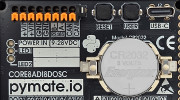
PymateIO Core Core8ADI8DOSC
|

|
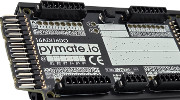
PymateIO 16ADI16DO expansion
|

|
CommandHMI [COMING SOON]
|
Product Nomenclature
| Letter | Feature |
|---|---|
| DI | Digital Input. It is prefixed with the number of input (ex : 8DI or 8ADI).
May be in combination with A. |
| A | Analog Input. It is prefixed with the number of analog input (ex : 8A or 8ADI).
May be in combination with DI. |
| DO | Digital Output. It is prefixed with the number of analog output. |
| S | Serial (RS485, MODBUS RTU) |
| C | CAN bus |
| P | SPI bus |
| I | I2C bus |
| U | UART |
| T | Modbus TCP |
Products tour
Programming HowTo
 | Page(s) under construction. |


- About MicroPython
- IDE and tools
- Connecting your board
- REPL: the command line
- main.py and boot.py
Programming First-step
| Page(s) under construction. |
- PymateIO methods
- Digitial Input/Output
- Analog Input
- User button
- User LEDs
- Real-Time clock
- Cycle timing
- PymateIO and 16ADI16DO
Common use-cases
| Page(s) under construction. |
- Remote Control (Télérupteur)
- Time relay (relais temporisé)
- Hystersis management
- Value mapping
- PID control
- Fine LED control
- Emergency Stop (using IRQ)
- Watchdog
- Data-Logging
Mini projects
| Page(s) under construction. |
- Tank refill
Expansion programming
| Page(s) under construction. |
- About board_id
- CAN bus scanning
- 16ADI16DO Programming
- Setting board_id
- Digital Input/Output
- Analog Input
Advanced programming
| Page(s) under construction. |
- About asyncio
- Creating tasks
- Scheduling tasks
PymateIO Expansion Bus
| Page(s) under construction. |
- The connector
- Accessing I2C bus
- Accessing SPI bus
- About CAN bus
References
| Page(s) under construction. |
- PymateIO library
- Helper libraries